4K60 · WIRELESS · HDMI + USB-C · USB 3.0 · 60W PD

4K60 Professional Wireless Meeting Integration SwitcherCQ1700W

One professional collaboration hub for wired HDMI and USB-C devices, AirPlay/Miracast wireless presentation, shared USB 3.0 peripherals, and integrated room control.

4K@60Hz 4:4:4 · 18Gbps HDMI 2.0b · 2 × HDMI + USB-C + Wireless · 4-Port USB 3.0 Auto-Follow · 60W USB-C PD · RS-232 / IR

PANIO · Technology from Taiwan

Product Overview

What Is the PANIO CQ1700W?

All-in-One Conference Collaboration Hub

PANIO CQ1700W is a professional 4K@60Hz 4:4:4 18Gbps multi-source presentation switcher engineered for modern meeting rooms and smart classrooms. It integrates wired HDMI/USB-C and wireless projection into one compact system.
Wired + Wireless + USB Peripheral Switching

Four input sources: 2×HDMI, 1×USB-C with 60W PD, and wireless projection supporting AirPlay, Miracast, and USB dongle. 4 USB 3.0 ports auto-follow the active video source for cameras, touchscreens, and keyboards.

Video Quality
4K60 · 4:4:4
Video Bandwidth
18Gbps HDMI 2.0b
Input Sources
2 HDMI + USB-C + Wireless
Wireless
AirPlay / Miracast
USB Sharing
4 × USB 3.0 Auto-Follow
USB-C Charging
Up to 60W PD
Audio Output
Phoenix Stereo
Room Control
RS-232 / IR / Auto
Product Video

CQ1700W 4K60 Wireless Meeting Switcher · Product Overview

See the CQ1700W hardware overview. For installation, host-to-USB mapping and wireless presentation options, refer to the system diagram and technical specifications below.

Key Features

Six Professional Features for Modern Collaboration

More than a basic HDMI switch: CQ1700W combines wireless presentation, USB peripheral switching, laptop charging, and centralized control.

4K@60Hz 4:4:4 Ultra HD

18Gbps bandwidth with HDR and HDCP 2.3 support, delivering crisp text and accurate colors for presentations.

Multi-Platform Wireless

Native AirPlay (iOS/macOS), Miracast (Android/Windows), dedicated USB dongle, and QuickShare App support.

USB 3.0 Auto-Follow

4 USB 3.0-A ports automatically switch to match the active video source; cameras and touchscreens work instantly.

60W USB-C PD Charging

Single USB-C cable handles 4K video, USB data, and 60W Power Delivery laptop charging simultaneously.

Flexible Control

Auto FIFO switching, front-panel buttons, IR remote, and RS-232 serial commands for integration.

Phoenix Audio Out

Professional stereo audio de-embedding via Phoenix terminal for direct connection to sound systems.

Why CQ1700W

Why Choose an Integrated Presentation Switcher?

Basic HDMI switches only route video. CQ1700W solves the full meeting room connectivity challenge.

▸ No Cable Clutter

Eliminate separate wireless dongles, USB switches, and chargers. One device handles video, wireless, USB, and power.

▸ One-Cable Laptop Connection

USB-C provides video, touchscreen USB, and 60W charging with a single cable—no power brick needed at the table.

▸ Professional Integration

RS-232 control, Phoenix audio out, and auto-switching FIFO logic integrate with commercial AV and smart room systems.

Important: The 4 USB 3.0-A ports follow the active video source—they are not a separate independent KVM switch. Only one video source is active at a time. Wireless projection requires the device to be powered; performance depends on Wi-Fi environment and client device.
Detailed Functions

How CQ1700W Works

  • 4K@60Hz 4:4:4 video: 18Gbps HDMI 2.0b bandwidth supports HDR, HDCP 1.4/2.2/2.3, and EDID management.
  • Four source inputs: 2×HDMI for fixed sources, 1×USB-C with DP Alt Mode, plus integrated wireless projection.
  • Wireless protocols: AirPlay for iOS/macOS, Miracast for Android/Windows, dedicated USB transmitter, and QuickShare App.
  • USB 3.0 auto-follow: 2×USB 3.0-B upstream (tied to HDMI 1/2) plus USB-C built-in upstream; 4×USB 3.0-A downstream follow the active source.
  • 60W USB-C PD: USB-C port charges laptops up to 60W while transmitting 4K video and USB data over one cable.
  • Multiple control methods: Auto FIFO switching, front-panel buttons, IR remote, and RS-232 serial commands.
  • Phoenix audio de-embedding: Independent stereo audio output via Phoenix terminal for amplifiers and PA systems.
  • USB media playback: FAT32-formatted USB drive with "Media" folder auto-loops video/image content when no source is active.
  • Web management: Access web UI at 192.168.69.1 for wireless settings and OTA firmware updates.
Deployment Modes

Three Meeting Room Collaboration Scenarios

CQ1700W adapts to BYOD, peripheral sharing, and integrated control room requirements.

01 · BYOD Presentation

Wired HDMI/USB-C laptops plus wireless phones/tablets can all present without adapters or cable confusion.

02 · Shared USB Peripherals

Cameras, interactive whiteboards, and mice automatically connect to the presenting computer—no manual switching.

03 · AV/Control Integration

Phoenix audio and RS-232 control connect directly to room automation systems and professional audio equipment.

Connection Architecture

CQ1700W System Diagram

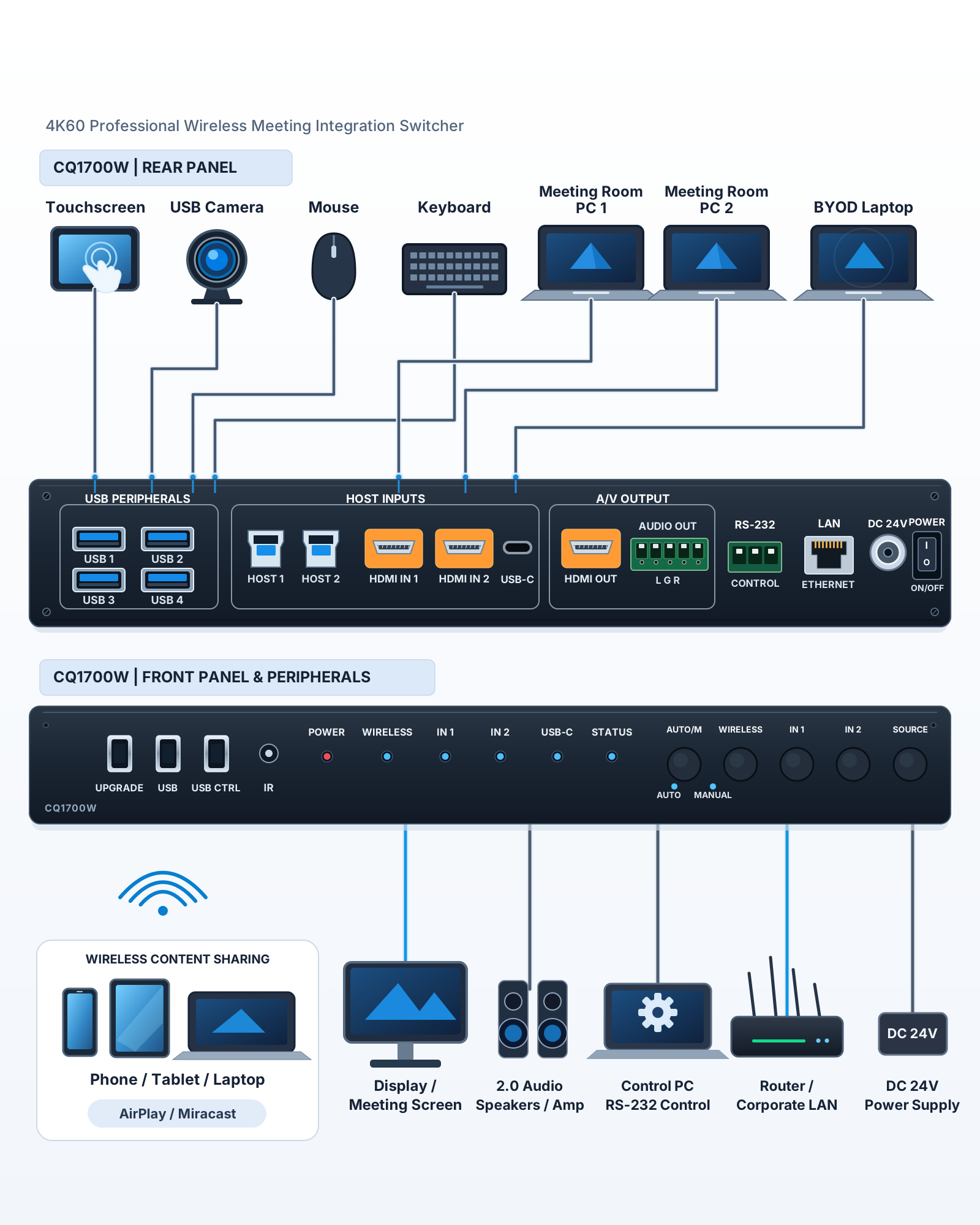
CQ1700W English wiring diagram showing HDMI PCs, USB-C laptop, wireless devices, 4K HDMI display and shared USB peripherals

Only one video source is active at a time. USB devices (USB Camera, Touchscreen, Keyboard / Mouse, Speaker / USB) follow the active video source. 2× USB 3.0-B upstream ports tie to HDMI 1 and HDMI 2; USB-C carries video, USB upstream, and 60W charging.

Applications

Where to Use the CQ1700W

Designed for multi-source presentation and collaboration in professional B2B environments.

Conference Rooms

Multiple presenters switch between laptops and phones; USB cameras/touchscreens auto-follow; single-cable USB-C charging.

Smart Classrooms

Teachers switch between teaching PC, tablets, and student devices; RS-232 integrates with campus control systems.

Exhibition Halls

USB auto-loop media playback for digital signage; instantly switch to live wireless presentation for guided tours.

Medical & Technical Training

High-resolution presentation for non-diagnostic training and review; USB peripheral sharing and room audio integration.

Auditoriums

Multiple HDMI source redundancy, HDCP 2.3 compliance for copyright content, IR/serial for backstage control.

Hospitality Venues

Background marketing media playback during breaks; instant guest wireless projection during events.

Technical Data

CQ1700W Technical Specifications

Specifications below follow PANIO CQ1700W product documentation. Verify cable quality, display compatibility, and USB power requirements for each installation.

SpecificationPANIO CQ1700W
VIDEO & BANDWIDTH
Product type4K@60Hz wireless presentation multi-source switcher (HDMI/USB-C/Wireless to HDMI)
Maximum resolution4K@60Hz 4:4:4; backward compatible with 1080p/720p
Bandwidth18Gbps (HDMI 2.0b)
StandardsHDMI 2.0b/1.4b, HDCP 1.4/2.2/2.3, HDR, EDID management
INPUT INTERFACES
Wired video inputs2×HDMI Type-A female; 1×USB-C female (DP Alt Mode)
Wireless inputIntegrated wireless receiver module (3 external high-gain antennas)
USB upstream2×USB 3.0 Type-B (tied to HDMI 1/2); 1×USB-C built-in upstream
Local upgrade/media ports3×USB 2.0 Type-A (UPGRADE / media playback)
OUTPUT INTERFACES
Video output1×HDMI Type-A female
USB downstream4×USB 3.0 Type-A (auto-follow with active video source)
Analog audio1×Phoenix terminal stereo de-embedded output
Power deliveryUSB-C port: up to 60W Power Delivery for laptop charging
WIRELESS & NETWORK
Wireless protocolsApple AirPlay, Android/Windows Miracast, dedicated USB transmitter, QuickShare App
Network modesLAN RJ45 for network integration; built-in dual-band Wi-Fi AP (SSID: QuickShare-xxxx)
Web managementDefault management IP: 192.168.69.1; use http://192.168.69.1 (see user manual for login details)
CONTROL, POWER & ENVIRONMENT
Switching methodsAuto FIFO, front-panel buttons, IR remote, RS-232 serial
RS-232 parameters115200bps, 8 data bits, 1 stop bit, no parity (8N1)
Power supplyDC 24V/3A locking power adapter (AC 100–240V, 50/60Hz)
Max power consumption72W (including 60W PD laptop charging at full load)
Dimensions267.5 × 103 × 27 mm (L × W × H)
WeightApprox. 0.98 kg
Operating temperature0°C to 50°C
Humidity10%–90% RH, non-condensing
Country of originDesigned in Taiwan
FAQ

CQ1700W Frequently Asked Questions

What wireless projection protocols does CQ1700W support?

CQ1700W supports four connection methods: Apple iOS/macOS via AirPlay; Android/Windows via Miracast; laptops via dedicated USB wireless transmitter for plug-and-play; also Android QuickShare App.

How does USB 3.0 auto-follow switching work?

Two rear USB 3.0-B ports tie to HDMI IN1/IN2; USB-C has built-in upstream. When switching video sources, 4 USB 3.0-A device ports auto-connect to the active source computer—no manual cable swaps.

Can USB-C transmit 4K and charge the laptop simultaneously?

Yes. USB-C supports DP Alt Mode 4K@60Hz video plus up to 60W PD charging. A single USB-C cable handles video, USB touch, and power.

How does automatic switching work?

First-in-first-served (FIFO) algorithm: new source detection triggers auto-switch; when the active source is removed, it falls back to the previous active source.

Can CQ1700W play media without a computer?

Yes. FAT32 USB drive with "Media" folder at root containing videos/images/music auto-loops when no other projection is active.

How do I update firmware and configure settings?

Connect to device hotspot, access http://192.168.69.1 web UI for wireless settings and OTA updates; or use front UPGRADE USB port for local firmware updates.

What does “Technology from Taiwan” mean for CQ1700W?

PANIO is a Taiwan-based professional AV technology brand. The phrase identifies PANIO's brand and technology background; it does not make an unverified claim about the CQ1700W manufacturing location.

Installation Notes

Important Installation Notes & Package Contents

Installation & Usage Notes

  • Ensure proper chassis grounding before powering on to prevent ESD damage.
  • Use certified 18Gbps HDMI cables for reliable 4K@60Hz 4:4:4 transmission.
  • Position wireless antennas upright and away from large metal obstructions.
  • The device generates heat under 60W PD load; maintain adequate ventilation.
  • USB media playback requires FAT32 format with "Media" folder named in English.
  • Windows firewall may prompt to allow the USB wireless transmitter on first use.

Standard Package

  • CQ1700W switcher main unit × 1
  • High-gain omni-directional wireless antennas × 3
  • IR remote control × 1
  • DC 24V/3A locking power adapter × 1
  • Rack mounting brackets × 1 set
  • User manual × 1

Planning a Conference Room, Classroom, or Exhibition Space?

Tell us your source count, display resolution, USB peripheral needs, and control system requirements. PANIO (Taiwan) can help evaluate CQ1700W for your project.