4K60 · USB-C + HDMI · DUAL HOST · 100W PD

4K60 Dual-Host Smart Meeting Integration SwitcherHK200_W

One professional meeting hub for a BYOD laptop and a fixed room PC, with 4K60 video, shared USB 3.2 peripherals, 100W charging, audio and centralized control.

USB-C DP Alt Mode + HDMI 2.0b · USB 3.2 Gen 1 5Gbps · 2 × Gigabit LAN · Balanced Audio · EDID · Web GUI / RS-232 / IR / CEC / GPIO

PANIO · Technology from Taiwan

Product Overview

What Is the PANIO HK200_W?

4K60 Dual-Host Meeting & BYOD Switcher

PANIO HK200_W is a 2-input / 1-output HDMI and USB-C meeting-room switcher for huddle rooms, executive offices and collaborative AV spaces. It selects between a full-featured USB-C laptop and a fixed HDMI + USB-B PC, sending the active source to one HDMI 4K display.

More Than a Basic Video Switch

One USB-C connection can combine 4K60 4:4:4 video, USB 3.2 Gen 1 data, Gigabit Ethernet and up to 100W PD with a compatible laptop. The integrated KVM hub, balanced audio, dual LAN, EDID tools and serial/network control support professional meeting-space integration.

Video Routing
2 Inputs / 1 Output
Video Quality
4K60 4:4:4
USB-C Power
Up to 100W PD
USB KVM
5Gbps · 2A + 1C
Network
2 × Gigabit LAN
Analog Audio
Balanced I/O
Smart Display
Welcome + CEC / IR
AV Control
RS-232 / Web GUI

PANIO HK200_W Professional Meeting Switcher

PANIO HK200_W professional 4K60 dual-host USB-C and HDMI meeting switcher, front-panel product view
One USB-C BYOD laptop or one fixed HDMI + USB-B computer shares a 4K display and three downstream USB 3.2 peripheral ports.
4K60 4:4:4HDMI 2.0b + USB-C100W PD5Gbps USB 3.2Dual Gigabit LANBalanced AudioEDID / AV Control
Key Features

Eight Capabilities for Professional Meeting Rooms

The HK200_W combines host selection, high-bandwidth video, USB peripherals and practical system control in a single compact AV hub.

One-Cable USB-C with 100W PD

Combine 4K60 DisplayPort Alt Mode video, up to 5Gbps USB 3.2 data, Gigabit LAN and up to 100W laptop charging in a compatible USB-C connection.

4K60 4:4:4 HDMI 2.0b

Handle up to 4K60 4:4:4 video with 18Gbps bandwidth, EDID management, scaling modes and test patterns for room integration.

3-Port USB 3.2 KVM Hub

Share a USB camera, microphone, keyboard or other peripherals through two USB-A and one USB-C 5Gbps downstream device ports.

Dual Gigabit Ethernet

Separate control and BYOD network paths in independent mode, or link ports in switch mode. IEEE 802.1X authentication and VLAN are listed.

Balanced Audio Integration

Use 5-pin terminal-block input and output for balanced or unbalanced analog audio embedding and de-embedding.

Multi-Protocol Control

Integrate Web GUI, RS-232 API, TCP/IP, Telnet, IR, CEC and four GPIO lines into professional AV control workflows.

EDID & Test Pattern Tools

Select built-in EDID presets, manage user-defined EDID, use Auto / Bypass / Force 1080p modes and display internal test patterns.

Welcome Screen & Auto Switching

Configure input selection, fallback behavior, welcome-screen display and HDMI power-saving and display power control.

Connection Architecture

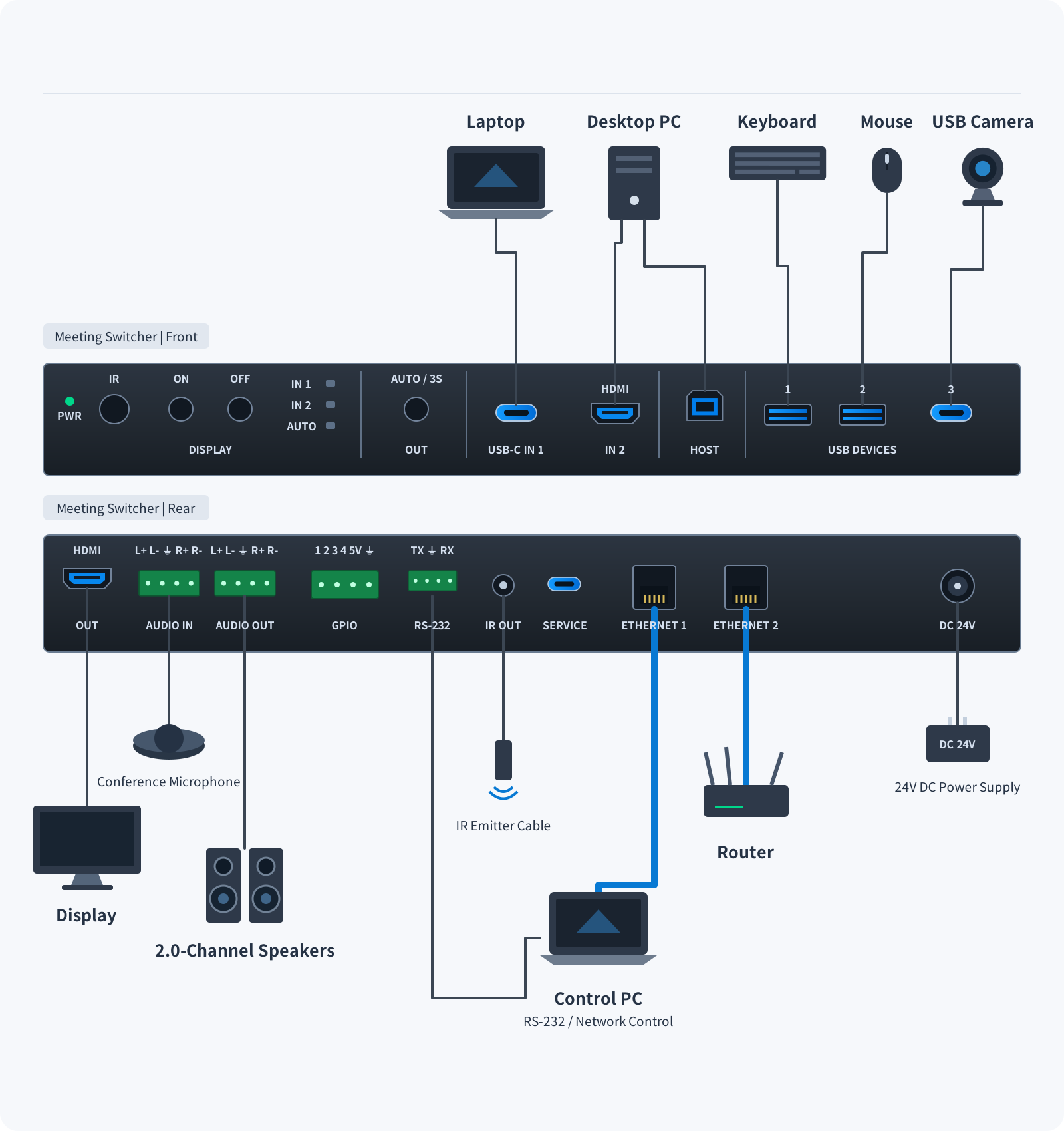
HK200_W Dual-Host Meeting System Connection Diagram

HK200_W Dual-Host Meeting System Connection Diagram A BYOD laptop connects to the HK200_W through USB-C while a fixed room computer connects through HDMI and USB-B. Select one host at a time. A separate analog audio input, 4K display, USB peripherals, audio output, LAN connections and control system attach to the switcher. Lines indicate physical connectivity, not one-way signal flow. HOSTS & AUDIO MEETING HUB SHARED OUTPUTS ONE ACTIVE HOST BYOD Laptop USB-C In-Room PC HDMI + USB-B Analog Audio Balanced AUDIO IN HK200_W Dual-Host Switching Shared Meeting Devices 4K Display HDMI OUT / 4K60 USB 3.2 Devices Camera / Mic / HID Audio Output Balanced AUDIO OUT Network Dual 1G LAN Control System RS-232 / IR / GPIO HK200_W Dual-Host Meeting System Connection Diagram A BYOD laptop connects to the HK200_W through USB-C while a fixed room computer connects through HDMI and USB-B. Select one host at a time. A separate analog audio input, 4K display, USB peripherals, audio output, LAN connections and control system attach to the switcher. Lines indicate physical connectivity, not one-way signal flow. ONE ACTIVE HOST BYOD Laptop USB-C In-Room PC HDMI + USB-B Analog In AUDIO IN HK200_W Dual-Host Switching Shared Meeting Devices 4K Display HDMI OUT / 4K60 USB 3.2 Devices Camera / Mic / HID Audio Output Balanced AUDIO OUT Network Dual 1G LAN Control System RS-232 / IR / GPIO

The BYOD laptop must support USB-C DisplayPort Alt Mode. USB peripherals share the available USB 3.2 Gen 1 bandwidth.

When analog audio embedding is enabled, the analog audio output is disabled. Connections are functional illustrations, not exact physical port locations.

Meeting Room Architecture

Three Ways to Integrate BYOD, Networking and Automation

A single switcher bridges user laptops, fixed room PCs, conference cameras, installed sound systems and networked management.

01 / BYOD

One-Cable BYOD Connection

Guests connect a compatible laptop via USB-C for high-resolution presentation and room-device access.

  • Up to 4K60 4:4:4 video
  • Up to 100W USB-C PD
  • USB camera / microphone sharing
  • Gigabit wired network access
02 / NETWORK

Dual-LAN Deployment Options

Adapt your meeting room to enterprise network requirements.

  • Independent mode: LAN 1 for device management and LAN 2 for the connected USB-C laptop
  • Switch mode: internal communication between LAN ports
  • 802.1X authentication and VLAN support
03 / CONTROL

Automated Displays & AV Control

Coordinate room startup, signal selection and display power.

  • Custom welcome image when no source is active
  • HDMI 5V power-saving behavior
  • CEC / IR / RS-232 power-on / off delays
  • Four GPIO lines for system integration
Deployment note: Use the supplied DC 24V / 7.5A adapter and a USB-C cable compatible with DisplayPort Alt Mode and the required power/data features. Two hosts can remain connected, but only one is active at a time.
Professional Integration

Why Choose HK200_W Instead of an Entry-Level HDMI Switch?

▸ Beyond a Basic HDMI Switch

Share video and USB peripherals between two computers without repeatedly re-plugging meeting-room equipment.

▸ Professional USB 3.2 Bandwidth

Three downstream 5Gbps USB ports support cameras, audio devices and input peripherals for modern meeting rooms.

▸ Balanced Audio for System Integrators

Terminal-block connections simplify connection to amplifiers, installed audio systems and external conferencing hardware.

▸ Enterprise-Oriented Network Options

Separate management and laptop networking with independent LAN mode, plus 802.1X and VLAN features.

▸ Room Automation

Welcome screen, programmable power actions, IR/CEC/RS-232 and GPIO reduce repeated manual room setup.

▸ Technology from Taiwan

PANIO is a Taiwan-based AV technology brand offering product planning, technical assistance and integration support.

Detailed Functions

HK200_W Functions & Integration Details

  • Dual video input: one full-featured USB-C IN1 and one HDMI 2.0b IN2, switched to a single HDMI 2.0b output.
  • USB-C BYOD input: combines DisplayPort 1.4a Alt Mode, up to 4K60 4:4:4 video, USB 3.2 Gen 1 5Gbps, Gigabit Ethernet and up to 100W USB Power Delivery.
  • HDMI input: supports up to 4K60 4:4:4 at 18Gbps, with HDMI 2.0b and HDCP 2.3 compatibility.
  • USB peripheral sharing: one USB-B upstream host port plus two USB-A and one USB-C downstream USB 3.2 Gen 1 ports; up to 5V/1.5A specified per downstream port.
  • USB routing: follow-video selection, manual mode and automatic detection are available.
  • Two LAN ports: independent mode separates device management and guest laptop network access; switch mode enables inter-port communication.
  • Enterprise networking: IEEE 802.1X (including the stated EAP-TLS / EAP-MSCHAPv2 options) and VLAN capabilities.
  • Analog audio input: a 5-pin terminal block accepts balanced or unbalanced analog input for embedding into HDMI or USB.
  • Analog audio output: a 5-pin terminal block routes de-embedded HDMI/USB audio to external amplifiers or speakers.
  • Audio gain: supports 0 to −50dB output gain adjustment and mute.
  • EDID: twenty integrated modes and two user-defined EDID configurations support a range of video/audio display requirements.
  • Video processing: Auto, Bypass and Force 1080p operating modes, plus an internal twelve-pattern test generator.
  • Custom welcome screen: a user-uploaded image may appear after 60 seconds without an input signal.
  • Display power management: HDMI 5V power saving, CEC, IR or RS-232 control, and configured startup/shutdown delay up to 1,200 seconds.
  • Input selection: automatic switching, manual control and configurable fallback on signal removal.
  • Remote integration: Web GUI, RS-232 API, TCP/IP (8000), Telnet (23), IR learning / transmission and CEC.
  • GPIO: four configurable I/O control lines for room-system interoperability.
  • Scenes: five nameable presets for saving and recalling preferred settings.
  • Installation: black metal enclosure with mounting brackets and feet for flexible fixed installations.
Applications

Where Does HK200_W Fit?

Designed for single-display collaboration spaces in which a permanently installed room computer and a guest laptop share meeting resources.

Huddle & Meeting Rooms

A single guest USB-C cable connects video, USB peripherals, network and laptop charging.

Executive Offices

Switch between a fixed desktop computer and a visiting laptop on a shared 4K display.

Training & Smart Classrooms

Let a lectern PC and an instructor laptop share display, microphone and presentation equipment.

Teams / Zoom Meeting Rooms

Connect supported USB cameras and microphones and assign them to the active host computer.

Corporate Presentation Rooms

Use dual-LAN modes, managed control and a custom welcome image for business spaces.

AV System Integration

Use RS-232, TCP/IP, CEC, IR and GPIO interfaces within professionally managed installations.

Technical Specifications

PANIO HK200_W Full Technical Specifications

SpecificationHK200_W Details
ModelHK200_W
Product Type4K60 2-input / 1-output USB-C & HDMI smart meeting switcher with 100W PD and USB 3.2 KVM hub
Video Inputs1 × USB-C IN1 (24-pin receptacle, DP Alt Mode, Gigabit Ethernet, 100W USB-PD)
1 × HDMI IN2 (HDMI Type-A, 19-pin receptacle)
Video Output1 × HDMI OUT (HDMI Type-A, 19-pin receptacle)
USB Upstream Hosts1 × USB-B HOST (9-pin, for a fixed room computer)
1 × USB-C IN1 (for a BYOD laptop)
USB Downstream Devices2 × USB-A DEVICES 1/2 (USB 3.2 Gen 1 5Gbps; up to 5V / 1.5A each)
1 × USB-C DEVICES 3 (USB 3.2 Gen 1 5Gbps; up to 5V / 1.5A)
Maximum Video Resolution3840 × 2160 @ 60Hz (4:4:4); 4096 × 2160 @ 60Hz (4:4:4)
Supported Video Timings4K60/50/30/24, 1080p @ 60/50/24Hz, 1920 × 1200, 1440p, 720p, 480p and 576p
Video Bandwidth & StandardsUp to 18Gbps video bandwidth; HDMI 2.0b, HDCP 2.3 and DisplayPort 1.4a compatibility
HDR FormatsHDR, HDR10, HDR10+, Dolby Vision and HLG (subject to source and display capabilities)
Color & Bit DepthRGB; YCbCr 4:4:4, 4:2:2, 4:2:0; 8/10/12-bit formats (4K60 4:4:4 at 8-bit)
Ethernet2 × Gigabit RJ45 ports; independent or switch modes; IEEE 802.1X authentication and VLAN support
Analog Audio Input1 × 5-pin 3.5mm terminal block, balanced up to 2Vrms / 20kΩ or unbalanced up to 2Vrms / 10kΩ; embedding to USB or HDMI
Analog Audio Output1 × 5-pin 3.5mm terminal block, balanced up to 2Vrms / 600Ω or unbalanced up to 1Vrms / 300Ω; extraction from HDMI or USB
Control InterfacesFront panel, Web GUI, RS-232 (3-pin terminal), IR output (3.5mm), front IR receive/learn window, LAN / TCP/IP (port 8000), Telnet (port 23), 4 GPIO signals (6-pin terminal), USB-C SERVICE for firmware
EDID Management20 built-in EDID modes including 4K60 multichannel and 1080p presets; 2 user-defined EDID configurations for upload/download
Scaling & Test PatternAuto, Bypass, Force 1080p and internal pattern generator (12 patterns)
Welcome Screen & Power ManagementCustom welcome screen after 60 seconds without input, HDMI 5V power saving, CEC / IR / RS-232 display power control with 0–1200 s delay
Input SwitchingAutomatic source/5V detection with configurable fallback; manual selection via front panel, Web GUI or API
Recommended Passive Cable LengthsUSB 3.2: up to 1.5m; HDMI: up to 3m; longer runs may require certified active/fiber cabling or extenders
ESD ProtectionIEC 61000-4-2: ±8kV air discharge; ±4kV contact discharge (per supplied specification)
External Power SupplyAC 100–240V, 50/60Hz input; DC 24V / 7.5A output
Power ConsumptionApproximately 37W without laptop USB-C charging; up to 145W with full 100W PD output
Dimensions & Weight230 × 130 × 23 mm; approximately 796g
HousingBlack metal enclosure
Operating & Storage EnvironmentOperating 0–40°C, 20–80% RH; storage -20–60°C, 10–90% RH, non-condensing

All specifications are subject to confirmed hardware capabilities and future product revisions. USB 3.2 Gen 1 5Gbps is an interface maximum, not a guaranteed per-peripheral throughput.

FAQ

HK200_W Meeting Room Design FAQs

Can the HK200_W deliver 4K60 video, USB data, Ethernet and 100W charging through one USB-C cable?

Yes. The USB-C IN1 port is designed to combine up to 4K at 60Hz 4:4:4 via DisplayPort Alt Mode, USB 3.2 Gen 1 data at up to 5Gbps, Gigabit Ethernet and USB Power Delivery up to 100W. The laptop and cable must support the required features; actual performance depends on the connected equipment.

Can two host computers use the USB camera and microphone simultaneously?

No. HK200_W is a two-input, one-output switching solution. A USB-C BYOD laptop and a fixed HDMI-plus-USB-B computer can remain connected, but the USB 3.2 peripherals are assigned to one selected host at a time. USB switching can follow the video source.

What is the difference between the two Gigabit Ethernet operating modes?

In independent mode, LAN 1 is used for network control and Web GUI management while LAN 2 provides Ethernet access to the connected USB-C laptop. In switch mode, the two LAN ports can communicate through the internal network switch. The supplied specification also lists IEEE 802.1X authentication and VLAN support.

What do balanced audio embedding and de-embedding mean?

The 5-pin terminal-block AUDIO IN connection accepts balanced or unbalanced analog audio that can be embedded into USB or HDMI. AUDIO OUT can de-embed audio from HDMI or USB to external amplification or loudspeakers. The source page states that analog AUDIO OUT is disabled while analog audio embedding is active.

Can HK200_W switch inputs automatically and control the display?

Yes. The switcher supports automatic and manual input selection, configurable fallback behavior and front-panel or network/serial control. It also supports a customizable welcome screen, HDMI 5V power-saving mode and compatible display power control through CEC, IR or RS-232.

Which control interfaces are available for system integrators?

HK200_W provides a front-panel control button, Web GUI, RS-232 API, TCP/IP control (port 8000), Telnet (port 23), IR learning/output, four configurable GPIO lines and CEC. Verify network access controls and equipment compatibility during installation.

What does Technology from Taiwan mean for HK200_W?

It signifies that the product's engineering design, technical architecture, and support services originate from PANIO in Taiwan.

Installation Notes & Standard Package

Installation & Compatibility

  • Audio Configuration: Enabling analog audio embedding disables analog AUDIO OUT.
  • Cable Limits: Maximum passive cable length is 1.5m for USB 3.2 and 3m for HDMI; longer runs require active or fiber-optic solutions.
  • Network Setup: Default IP is 192.168.0.100. Modify settings via Web GUI or RS-232 as required.
  • USB-C Requirements: Host port must support DisplayPort Alt Mode for video. Charging wattage (USB-PD), data rates, and network performance depend on host device and cable capabilities.
  • Power Supply: Requires a DC 24V / 7.5A power adapter. Do not use unverified power supplies.
  • Installation: Secure the unit with mounting brackets, ensure adequate ventilation, and verify the full system chain prior to deployment.

Standard Package Contents

  • HK200_W main unit × 1
  • DC 24V / 7.5A power adapter × 1
  • IR emitter cable, 1.5m × 1
  • 3-pin 3.5mm RS-232 terminal-block connector × 1
  • 5-pin 3.5mm balanced audio terminal-block connectors × 2
  • 6-pin 3.5mm GPIO terminal-block connector × 1
  • Mounting brackets × 2, with KM3 × 6 screws × 4
  • Rubber feet × 4, with M3 × 5 screws × 4
  • User manual × 1

Planning a 4K60 BYOD Meeting Room with USB-C, 100W PD and KVM?

Share your laptop interfaces, room PC setup, camera and microphone requirements, network policy and preferred AV control protocol. PANIO can help evaluate HK200_W for your installation.