PROFESSIONAL 8-PORT HDMI KVM · 4K30

HK802

8-Port 4K HDMI KVM Switch with 0-Second Seamless Switching

Control eight computers from one HDMI display, keyboard and mouse while sharing USB 2.0 peripherals. HK802 combines instant switching, auto-scan, selectable output scaling, audio extraction and RS-232 control for professional multi-computer workspaces.

8 × HDMI + USB Inputs · 1 × HDMI Output · Up to 3840×2160@30Hz · USB 2.0 Hub · 3.5 mm Audio · IR / Hotkey / Panel / Mouse / RS-232

What is PANIO HK802?

HK802 is a professional 8-port HDMI KVM switch designed to let one operator manage up to eight computers through a single 4K HDMI display, USB keyboard and mouse.

It is built for environments where fast source changes matter, combining 0-second seamless switching, USB 2.0 peripheral sharing, automatic scanning, resolution scaling, audio de-embedding and RS-232 control in one compact system.
Best fit for control rooms and multi-PC workstations

Choose HK802 when a desk, rack or operations station must access many computers quickly without reconnecting keyboards, mice, displays or shared USB devices.

Key Features

Fast, Centralized Control of Eight HDMI Computers

HK802 brings video, USB and control switching together to simplify multi-computer operation.

8×1

8-Computer KVM

Centralize eight HDMI computers on one display, keyboard and mouse.

0s

Seamless Switching

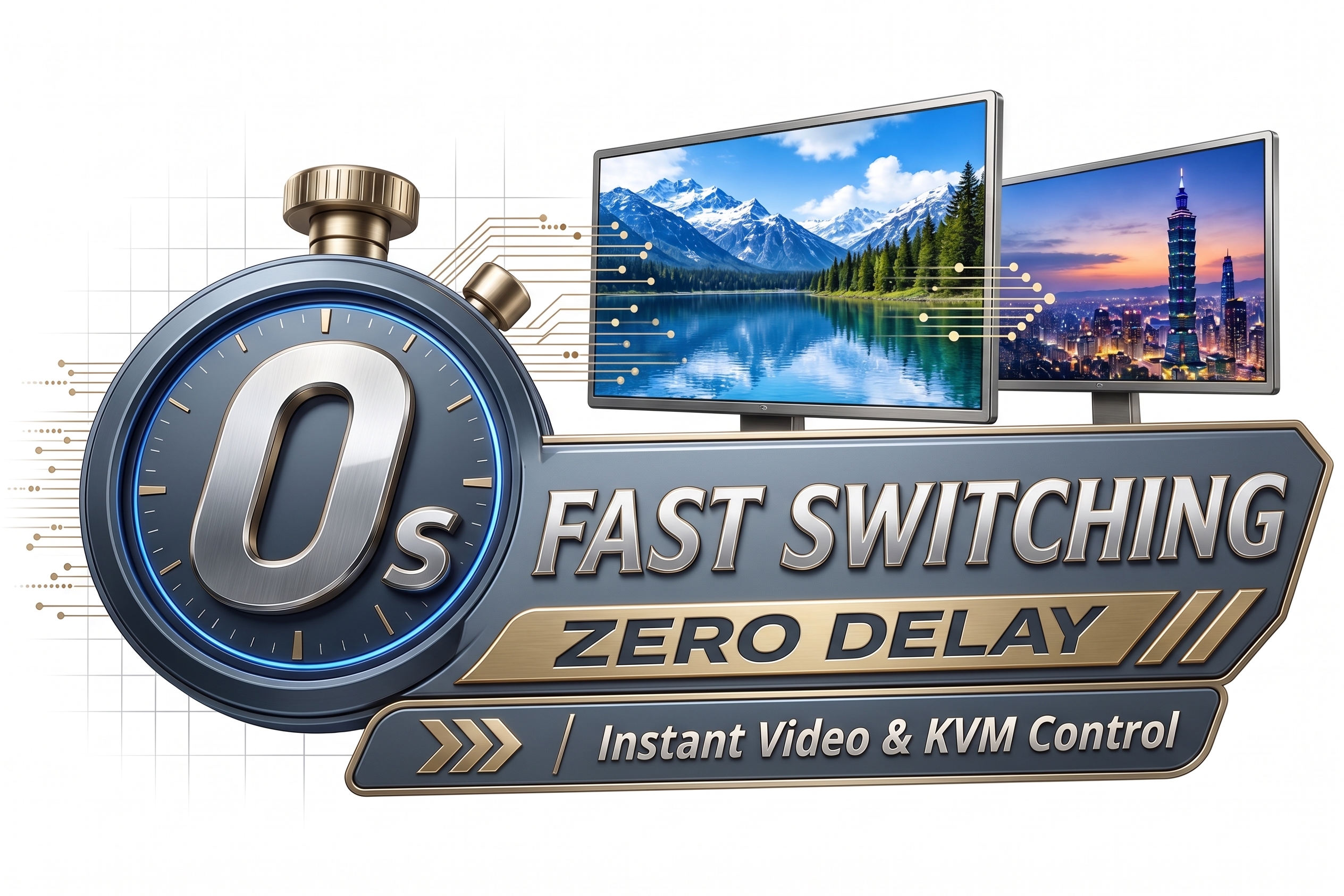
0-second source switching is designed to avoid the normal black-screen waiting period.

4K

Up to 4K30

Supports display resolutions up to 3840 × 2160 at 30 Hz.

USB

USB 2.0 Sharing

Share compatible USB 2.0 peripherals such as storage, printers and touch devices.

SCAN

Auto-Scan

Automatically cycles through connected sources at the product's built-in 3-second interval.

↑↓

Output Scaling

Selectable fixed output resolutions include 1366×768, 720p, 1080p and 4K30.

AUDIO

Audio Extraction

A 3.5 mm audio output provides separate audio connection for external speakers or amplifiers.

RS-232

RS-232 Control

Integrate HK802 with control systems through RS-232 commands, including EDID-related settings.

Instant Switching

0-Second Seamless Switching

HK802 is designed for immediate source changes without the normal HDMI black-screen waiting period, helping operators move quickly between multiple computers in control rooms, monitoring desks, test stations and professional KVM workspaces.

PANIO HK802 0-second seamless fast switching with zero-delay video and KVM control
PANIO HK802 8-port 4K HDMI KVM switch product view
Why HK802

Designed for Efficient Multi-Computer Operation

▸ Faster Operator Switching

Move among eight computers without repeatedly changing display, keyboard or mouse connections.

▸ Reduced Black-Screen Delay

Seamless switching keeps the selected video available immediately instead of waiting through normal HDMI resynchronization.

▸ Shared USB Peripherals

Reduce duplicate USB devices by sharing compatible peripherals through the integrated USB 2.0 hub.

▸ Flexible Output Resolution

Fixed output scaling helps match different display and workflow requirements.

▸ Multiple Control Methods

Operate by front-panel buttons, IR remote, hotkey, USB mouse switching or RS-232.

▸ Automatic Source Handling

Auto detection can prioritize the latest active source and hide inactive ports to streamline operation.

Functions

Detailed Function Description

  • 8-port centralized KVM: manage eight HDMI computers through one HDMI display and one keyboard/mouse workstation.
  • 4K video: supports resolutions up to 3840 × 2160 at 30 Hz.
  • USB 2.0 peripheral sharing: share compatible printers, USB storage devices, touchscreens and other USB 2.0 peripherals.
  • 0-second switching: designed for instant source changes without the normal black-screen transition delay.
  • Auto-scan: automatically advances through ports using the built-in 3-second scan interval.
  • Automatic signal detection: can prioritize the latest active input and hide inactive ports from the switching sequence.
  • Resolution scaling: selectable fixed outputs include 1366×768, 720p, 1080p and 4K30.
  • Multiple control methods: IR remote, front-panel buttons, hotkey, USB mouse switching and RS-232 command control.
  • Audio de-embedding: 3.5 mm analog audio output supports connection to an external audio system.
  • Power-saving operation: supports operating and standby modes.
PANIO HK802 interfaces and KVM switching overview
Applications

Ideal Applications for HK802

Suitable wherever one operator needs rapid and reliable access to multiple HDMI computers.

🖥️

Multi-PC Workstations

Operate multiple desktop PCs or workstations from one keyboard, mouse and monitor.

🎛️

Control Rooms

Switch quickly among monitoring, management and application computers from a centralized console.

🏢

IT & Server Desks

Reduce desktop clutter when technicians need access to several local HDMI systems.

🏫

Training Labs

Allow instructors or administrators to select among multiple computers at a shared console.

🧪

Test Benches

Compare or validate multiple PCs and source devices without repeatedly reconnecting peripherals.

📺

Demo Systems

Present content from different computers quickly on one shared 4K display.

System Design

HK802 Signal and Control Flow

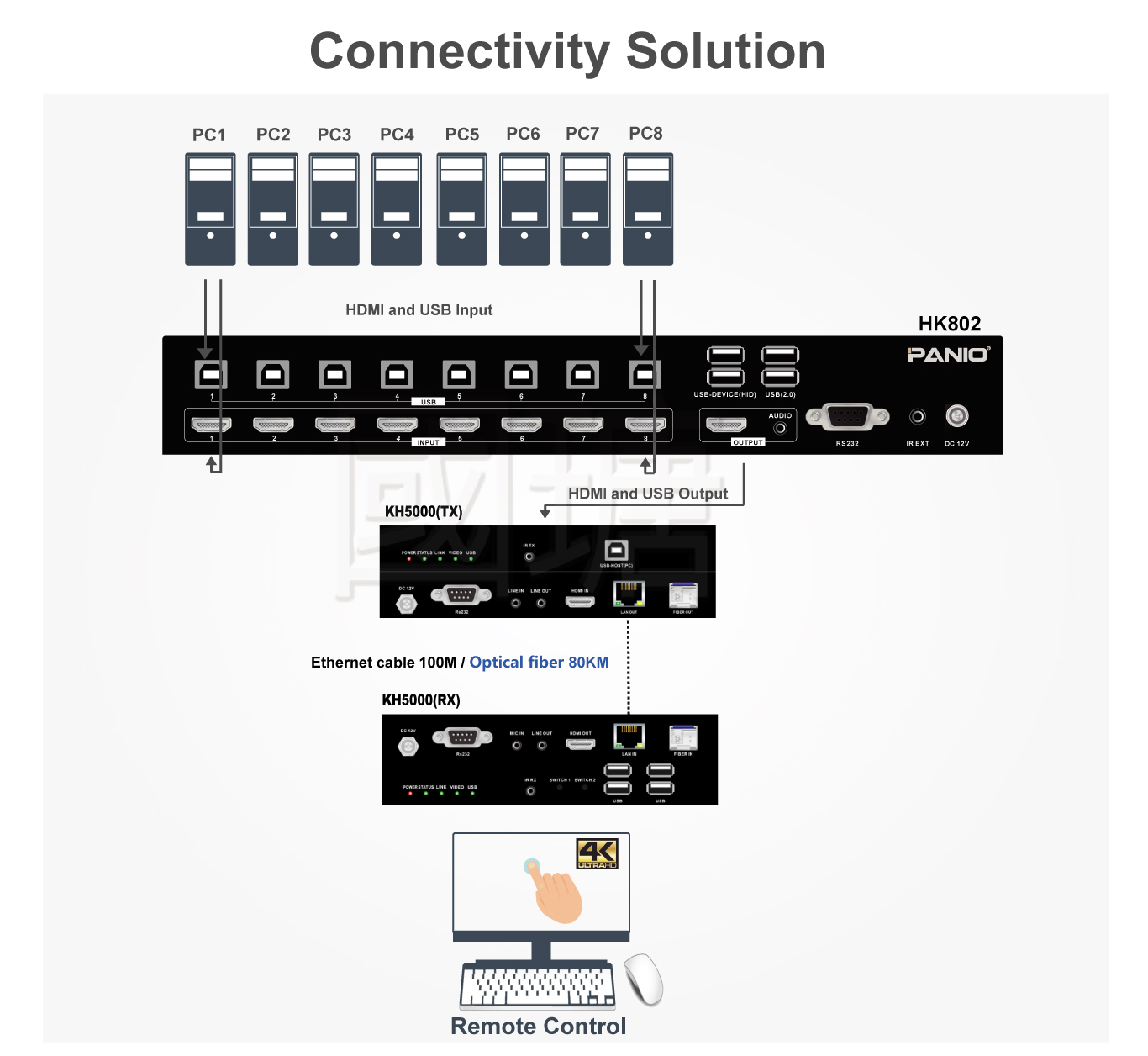
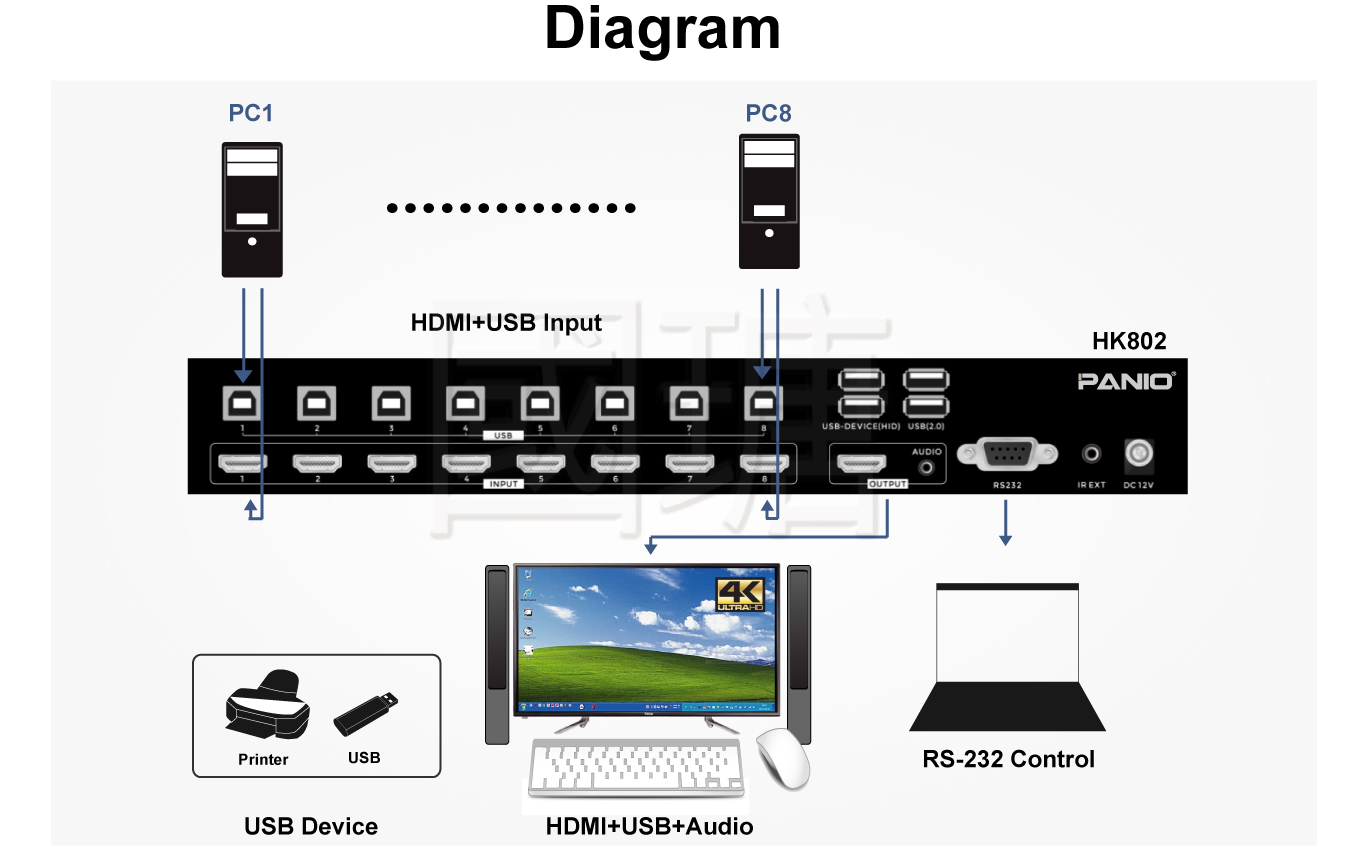
8 Computers → HK802 → Shared KVM Console
HK8028-Port 4K HDMI KVMSeamless Switching · USB 2.0Auto-Scan · Scaling · RS-232 Computer 1–2 Computer 3–4 Computer 5–6 Computer 7–8 HDMI DisplayUp to 4K30 Keyboard / MouseShared KVM Console USB PeripheralsUSB 2.0 Sharing IR · Hotkey · Front Panel · Mouse · RS-232
System Profile
  • Computer inputs: 8 × HDMI plus 8 × USB host connections.
  • Display output: 1 × HDMI, up to 3840 × 2160@30Hz.
  • USB console / hub: 4 × USB output ports for keyboard, mouse and compatible peripherals.
  • Control: IR, front-panel buttons, hotkey, USB mouse switching and RS-232.
  • Audio: independent 3.5 mm analog audio output.
Positioning: a professional 8-computer desktop or rack-side KVM solution for centralized operation, testing, IT management, control-room and multi-PC applications.
Technical Data

HK802 Technical Specifications

SpecificationHK802
Product Type8-port HDMI KVM switch
Computer Inputs8 × HDMI, 8 × USB
Outputs / Interfaces1 × HDMI, 4 × USB, 1 × RS-232, 1 × 3.5 mm audio
Maximum ResolutionUp to 3840 × 2160 at 30 Hz / 4K30
Auto-Scan Interval3 seconds
Resolution Scaling1366×768 / 720p / 1080p / 4K30 selectable fixed output
Control MethodsIR remote, front-panel buttons, hotkey, USB mouse switching, RS-232 command
USB Peripheral SharingUSB 2.0 hub function
Audio Output1 × 3.5 mm analog audio output
Power SupplyDC 12V / 1.5A
Dimensions310 × 103 × 44 mm (L × W × H)
Weight1.2 kg
FAQ

HK802 Frequently Asked Questions

How many computers can HK802 control?

HK802 is designed to centrally manage up to eight HDMI computers from one display, keyboard and mouse workstation.

What is the maximum resolution?

HK802 supports video resolutions up to 3840 × 2160 at 30 Hz.

Does HK802 support seamless switching?

Yes. HK802 provides 0-second source switching designed to avoid the normal black-screen waiting period between selected computers.

Can HK802 share USB devices?

Yes. The integrated USB 2.0 hub can share compatible peripherals such as storage devices, printers and touch interfaces.

How can I switch between computers?

Available methods include the IR remote, front-panel buttons, hotkey operation, USB mouse switching and RS-232 commands.

Does HK802 have automatic scanning?

Yes. The supplied specification lists an automatic 3-second scan interval.

Can HK802 output a fixed resolution?

Yes. The supplied source lists selectable scaling to 1366×768, 720p, 1080p and 4K30.

Installation Notes

  • For 4K operation, use high-quality certified HDMI cables and keep the signal path as direct as possible.
  • Use the supplied or factory-approved USB cables for stable KVM and USB operation.
  • Avoid chaining uncertified switchers, converters or adapters during initial testing.
  • Use only the specified DC 12V / 1.5A power adapter.
  • Test industrial PCs, touchscreens and specialized USB peripherals before deployment because compatibility can vary by device.
  • The IR remote battery may not be included because of shipping restrictions.

Package Contents

  • HK802 Main Unit × 1
  • DC 12V / 1.5A Power Adapter × 1
  • IR Remote Controller × 1 (battery not included)
  • Rack Mount Kit × 1
  • User Manual × 1

Planning an 8-Computer KVM Workstation?

For compatibility planning, provide your computer models, HDMI resolution, display model, USB devices, required control method and cable lengths. This helps determine whether HK802 is suitable for the intended installation.